
How to Buy a Used Concept2 Rowing Machine: What to Check and What Actually Matters
Updated: Mar 11

Buying a second-hand Concept2 rowing machine can be a smart investment, if you know what you’re looking at. These machines are famously durable, with affordable, readily available replacement parts, meaning a well-maintained used erg can perform almost identically to a new one. But not all second-hand ergs are equal. Condition matters far more than age, and that’s where inspection becomes essential. Knowing what to check (and what actually matters) can save you money, frustration, and unpleasant surprises. This guide shows you exactly how to assess whether a used Concept2 is genuinely good value.
*This article is intended as a general guide only. All prices quoted are accurate at the time of writing, but pricing and availability may change. For the most up-to-date information, always refer to the Concept2 website.
An Example from Experience
I bought my second-hand Concept2 from someone I knew who’d purchased it during the COVID lockdowns. Once gyms reopened, it saw little use and was taking up space, so he was keen to sell. Although it needed a clean, a closer inspection showed the machine itself was in excellent condition. It had very low lifetime metres (around 350,000), had been stored indoors, and was mechanically sound. After a 30-minute clean and a firmware update, it was effectively as good as new. I paid £500 at a time when new machines were retailing for £860, a significant saving - and the erg got a second lease of life.
What to Check When Buying a Used Concept2
Before going to view a machine you’re interested in, it’s worth asking a couple of simple questions, starting with where the machine has been stored. If it’s been kept somewhere that may be cold or damp, such as a garage, it’s sensible to ask whether it was stored under a cover. In these cases, pay closer attention to the condition of the frame for signs of corrosion, and make sure the performance monitor is working properly.
If you go ahead with a viewing, it’s reasonable to set a few expectations with the seller. Ask whether it’s possible to see the machine set up and to row a few metres. It’s also sensible to check there are batteries in the performance monitor so you can confirm it powers on and review a few key details. None of this is unreasonable — a genuine seller should expect a prospective buyer to want to see the machine working.
Below are the key things to check.
Identify the model
The first thing to establish when viewing a second-hand Concept2 is exactly which model it is. Different models vary in age, compatibility with modern performance technology, and long-term support for replacement parts. While older machines can still perform extremely well, knowing the model helps you understand what upgrades are possible, what parts are readily available, and whether the asking price is fair compared to new and refurbished options.
Most second-hand Concept2 rowing machines you’ll encounter are Model C, Model D, or Model E. The Model D is by far the most common, widely used in homes, gyms, clubs, and indoor competitions. The Model E is very similar to a Model D but has a noticeably higher seat and monorail, which some people prefer for ease of getting on and off. (Personally, I prefer being lower to the floor, as it’s not as far to fall when I collapse off at the end of a hard session!) Machines manufactured from 2021 onwards are sold simply as the RowErg, available with either standard or tall legs.
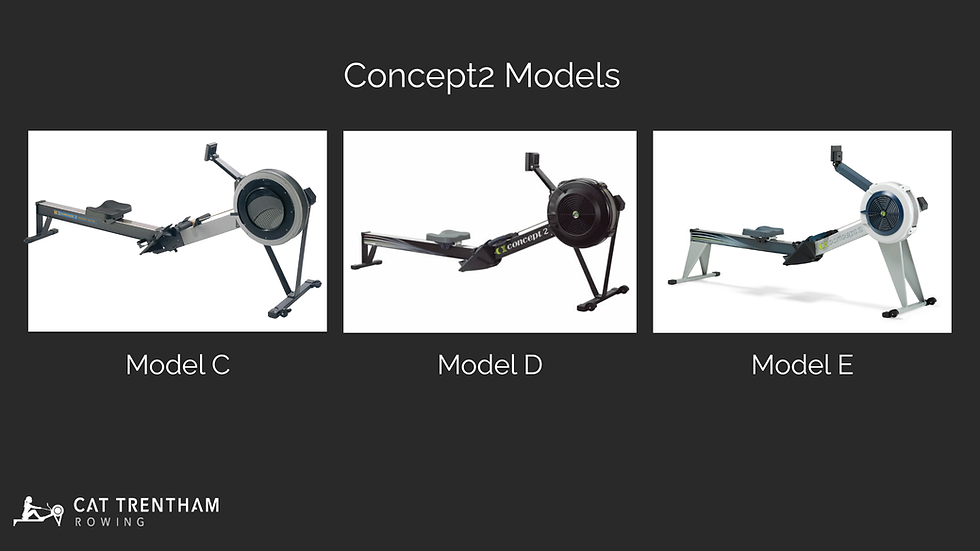
The older Model C looks broadly similar to a Model D, but has flatter foot stretchers and is more likely to be fitted with an older performance monitor and a straight wooden handle. The Model C was manufactured between 1993 and 2003, meaning any example you see will be at least 20 years old. A well-maintained Model C can still be a very good option, but there are a few additional considerations to factor in.
If you’re looking at a Model C, it’s particularly important to check which performance monitor is fitted. Some Model C machines still have their original PM2 monitor. While these monitors can still function, they do not have Bluetooth connectivity, meaning you won’t be able to connect to training apps such as ErgData or ErgZone without upgrading.
It’s also worth knowing that if a PM2 fails, replacement parts are no longer available. In that situation, the only option is to upgrade to a newer monitor, typically a PM5. This is the most expensive single component to replace (~£160), so it’s important to factor this potential cost into your budget and reassess whether the machine still represents good value once an upgrade is taken into account.
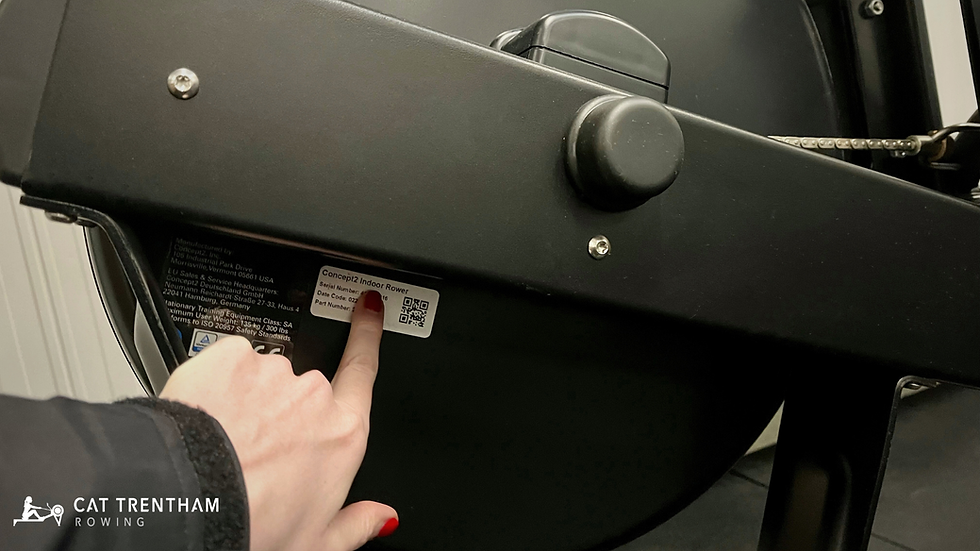
If you’re still unsure which model you’re looking at, the machine’s serial number or date code can be used to confirm the exact model and year of manufacture via Concept2’s website. The machine serial number is usually found on the back of the flywheel housing, as shown below.
Check the performance monitor
The performance monitor is central to how a Concept2 is used, so it’s worth checking carefully that it’s working as expected and suits how you plan to train. Start by confirming which monitor is fitted. The monitor type (PM2, PM3, PM4, or PM5) is clearly labelled at the top of the unit. Check that it powers on reliably, that the screen is clear and legible, and that all buttons respond properly. If possible, start a short workout to confirm everything functions as it should.
To check lifetime metres, navigate to Memory → Summary on the monitor. This will show the total distance recorded on that monitor, along with the number of workouts completed. As a rough guide, under 2 million metres would generally be considered light use, while 10 million metres or more suggests heavy use. Numbers in between sit on a spectrum and should always be interpreted alongside the physical condition of the machine.
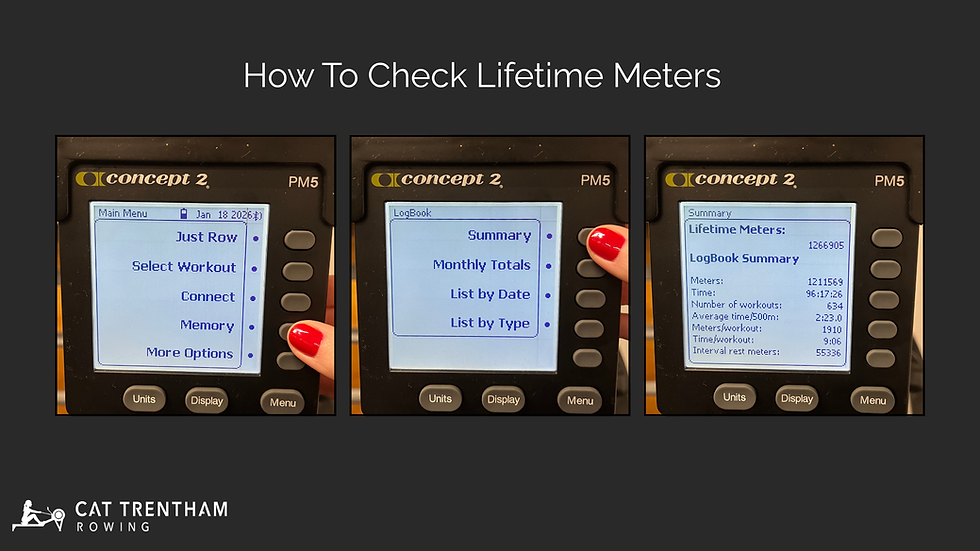
It’s also worth looking beyond the headline lifetime metre figure. In the same memory menu, you can view average metres per workout and typical split times. This can give useful insight into how the machine has been used. Lots of longer workouts at steady splits often suggest endurance-based training, whereas consistently short workouts at fast splits may indicate harder, more aggressive use. Neither is inherently bad, but it helps put overall wear and tear into context.
Remember that lifetime metres are stored in the monitor, not the machine itself. If a monitor has been replaced, the displayed metres may under-represent the machine’s true usage, so always assess this alongside the mechanical condition of the erg.
Finally, inspect the screen closely for damage. Clouding, blotches, or dead areas can sometimes result from cleaning sprays being applied directly to the display. On a PM5, the LCD and front case can be replaced independently if needed (~£36), and replacement LCDs are also available for PM3 and PM4 monitors (~£42.50). Minor screen damage is therefore often repairable and doesn’t automatically make a machine poor value.
If the machine is fitted with a PM5, it's also worth checking whether the firmware is up to date. Updating the firmware is free and straightforward via the ErgData app or Concept2's Ultility software, and can fix bugs and improve app connectivity.
Test the flywheel and drag factor
Once you’ve confirmed the monitor is working properly, it’s time to row a few strokes and pay attention to how the machine feels. The flywheel and drag factor together give useful insight into the internal condition of a Concept2, and issues here are often immediately noticeable.
Start by rowing lightly for a minute or so. The flywheel should spin freely, without scraping, grinding, or rattling noises. Resistance should feel smooth and consistent through the stroke, with no sudden changes as the flywheel accelerates or slows.
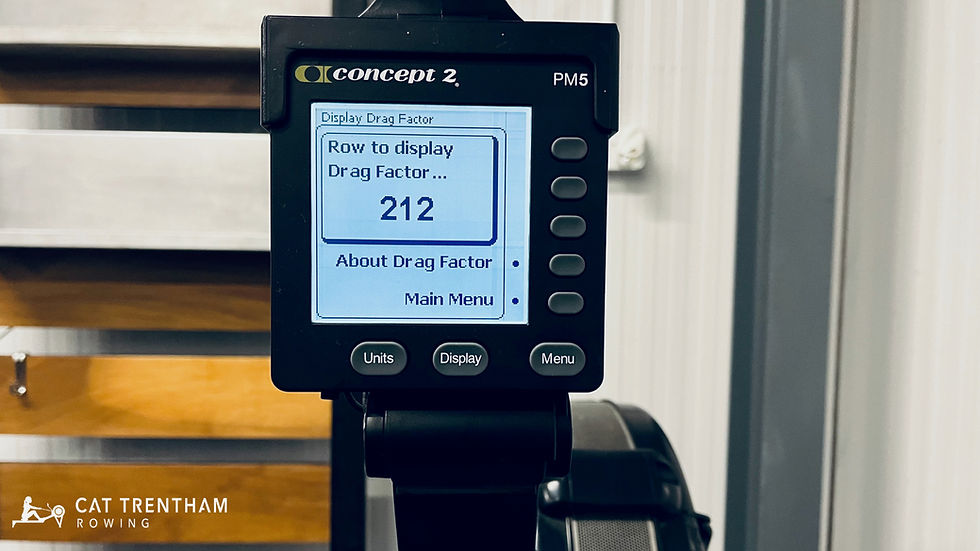
Next, check the drag factor. Navigate to More Options → Display Drag Factor, set the damper around 4-5, and take a few strokes to see the number displayed. On a clean, well-maintained machine, you’d typically expect a drag factor in the region of 110–130, depending on the model and environment. Values well outside this range aren’t necessarily a problem, but they do warrant further investigation.
It’s also worth checking the maximum drag factor by setting the damper lever to 10 and taking a few strokes. On a healthy machine with a clean flywheel housing, you’d expect a noticeably higher drag factor than at mid damper, often in the region of 195-220. If the maximum drag factor is a little lower than expected, this is usually due to dust and debris inside the flywheel housing and can often be resolved by cleaning. However, if the maximum drag factor is significantly lower than expected and doesn’t respond properly to damper changes, it may indicate a more serious issue affecting airflow or internal components.
Pay close attention to how the stroke feels. Any sensation of the resistance slipping, catching, or disengaging under load is a red flag, as it can indicate wear in the clutch mechanism. Personally, I would avoid buying a machine that shows signs of slipping during the stroke.
Chain, shock cord, and seat rollers
The chain, shock cord, and seat rollers are all relatively high-wear components on a Concept2 and are designed to be replaced over the life of the machine. Finding wear here is normal. What matters is understanding what’s worn, how involved the fix is, and whether the price reflects that.
Start by inspecting the chain. Pull it out to its full length and look closely at its condition. It should move smoothly without sticking and be lightly oiled rather than dry or rusty. Surface grime is common, but corrosion, stiff links, or rough movement suggest poor maintenance or exposure to moisture. Concept2 recommend oiling the chain routinely, every 50 hours of use, using a light oil such as 3-in-One. If a chain looks generally healthy but a little dry, regular oiling can often restore smooth operation.
If the chain does need replacing, Concept2 recommend replacing the sprocket at the same time, as they wear together. A replacement chain and sprocket set costs around £41.50 - not a deal-breaker, but something to factor into the price.
Next, check the shock cord by pulling the handle out, holding it gently and letting it return under its own tension. It should retract smoothly and fully back into the flywheel housing. If the handle sags or doesn’t return cleanly, the shock cord may be stretched or worn. This is very common on older machines and is one of the cheapest fixes, costing around £6.50 to replace.
Finally, pay close attention to the seat rollers. Roll back and forth on the rail and feel for clicking, rumbling, or uneven movement. The seat should glide smoothly without wobbling. Worn rollers are common, particularly the top seat rollers, which take the most load. (Replacing both top rollers typically costs around £25.) What you want to distinguish here is normal roller wear versus an issue with the seat frame itself. If the seat feels loose, twisted, or unstable, this can indicate wear or damage to the seat frame. Replacing the complete seat frame costs around £66, making it something you’d want to factor more seriously into the asking price.
Overall, this type of wear is part of normal ownership. The key is recognising routine, inexpensive maintenance versus larger structural issues. Most replacements are straightforward to do yourself, with clear step-by-step guidance available on the Concept2 website.
Foot stretchers, straps, and handle
Foot stretchers, straps, and the handle are largely cosmetic and affect comfort rather than mechanics. Wear here is very common on used machines and rarely indicates a problem with how the machine performs. In most cases, issues in this area are usually easy and inexpensive to resolve, and shouldn't carry much weight in your buying decision.
Start with the foot stretchers. Cosmetic scuffing and wear is very normal. Check that they adjust smoothly and lock securely into position. Even if the covers need replacing, they’re inexpensive (around £9.40 each), so visible wear here isn’t really a reason to question the price.
Next, look at the foot straps. They should adjust easily and hold securely under tension. Fraying or stretching is common on heavily used machines, but straps are very cheap to replace (around £3.30 per strap) and shouldn’t influence your buying decision.
Finally, check the handle. It should feel solid, with no cracks or structural damage. Wear is typically cosmetic and easy to address if needed, with a replacement costing around £17.50.
Replacement Parts and Warranty Considerations
One of the reasons Concept2 machines tend to hold their value is the long-term availability of spare parts. Concept2 continue to manufacture and supply parts for older models long after they stop producing them, meaning worn or damaged components can usually be replaced individually rather than requiring specialist repair or full replacement of the machine.
It’s also worth understanding how warranty coverage works. New Concept2 machines come with a five-year warranty on the frame and a two-year warranty on moving parts, starting from the original date of purchase. Importantly, Concept2 state: “This warranty is fully transferable to each subsequent owner of your indoor rower during the term of the warranty should you sell it or give it away.” In practice, this means that a second-hand machine may still have valid warranty coverage if it is relatively new, even if you are not the original purchaser.
Paperwork and Proof of Ownership
If you’re buying second-hand, it’s also worth asking for a simple invoice or receipt that includes the machine’s serial number. This can be useful for insurance purposes and as proof of ownership if you ever need it. It doesn’t need to be formal: even a dated receipt with names of the seller and buyer, the price paid, and the serial number is sufficient.
Refurbished Machines and Ways to Reduce the Cost of Buying New
If a second-hand machine doesn’t feel like the right fit, there are a few alternatives that can reduce the cost of buying new without taking on as much uncertainty. (At the time of writing, a brand-new Concept2 RowErg retails for around £990.)
One option is a professionally refurbished machine. These are typically inspected, cleaned, and fitted with new wear parts before being resold. The exact level of refurbishment varies by seller, so it’s worth checking what work has been carried out and whether any warranty is included. Refurbished machines usually cost more than a private second-hand sale, but that often reflects reduced risk and less immediate maintenance.
There are also a few ways to reduce the cost of buying new directly from Concept2:
Bulk orders: When purchasing five or more ergs directly from Concept2, a 5% discount is applied. This can be a mix of different machines (for example, RowErgs, BikeErgs, and SkiErgs), making it relevant for clubs or shared training spaces.
Competition race machines: At events such as the British Rowing Indoor Championships, Concept2 sell the race machines after the event at a discount (typically around £100 off). These machines have had two days of competition use but are otherwise effectively new. Buyers need to collect the machine from the venue, but when split into two parts, a RowErg will fit into most cars.
30-day money-back returns: Concept2 offer a 30-day money-back guarantee on new machines. Occasionally, machines are returned under this policy. Concept2 operate a waitlist you can request to join for these returns, which are usually sold at a 5% discount, or 10% if there is visible cosmetic damage.
The right choice for you will depend on your budget, how much reassurance you want around condition and warranty, and how comfortable you are factoring maintenance or minor cosmetic issues into your decision.
Final thoughts
When buying a second-hand Concept2, the most important thing is to think in terms of total cost, not just the price on the advert. That means considering the cost of the machine plus any replacement parts it’s likely to need in the near future.
In practice, a used machine that needs a new chain or monitor upgrade may still be good value, but only if the asking price reflects that. Once the cost of the machine and any immediate replacements starts to exceed around 70% of the price of a new machine, it’s worth pausing and reassessing. At that point, the benefits of buying new — a full warranty and no maintenance to factor in — become increasingly relevant. A very lightly used, newer machine with warranty remaining could justify edging higher, whereas a much older machine with more unknowns generally would not.
If you enjoyed reading this article and would like to be notified about new articles and training insights, you can sign up to my free monthly newsletter.


